
MusicplayOnline student access requires no personal information — it is entirely generic and depersonalized. For more information, see "1. What do we do to protect students" in our privacy policy found here.
Student access is included with every MusicplayOnline teacher subscription at no additional cost. Access is managed through Student Codes — two unique codes per teacher account that students use to log in.
What are Open Mode and Focus Mode?
Each teacher account comes with two Student Codes — Open Mode and Focus Mode — that control how students access the site.
Open Mode allows students to browse MusicplayOnline freely with some teacher-only sections restricted. Focus Mode locks students to a single shared page with all site navigation removed.
What does Open Mode allow?
The Open Mode code lets students log in and navigate MusicplayOnline normally, with a few restrictions compared to teacher access:
- No access to Lesson Planning section or Documents
- No direct access to MyList section (they can still access a list through a direct link)
- No access to downloadable pdfs or tracks
What does Focus Mode allow?
Focus Mode lets you share a link with students that locks them to a single page. When students open a Focus Mode link, they cannot navigate away from that page.
Focus Mode shares all the same restrictions as Open Mode. Additionally, all navigation elements are removed from the page — including the left-side menu and links to related resources.
Sharing links
To share a link with your students, find the resource you wish to send to them and click the 'Share' button.
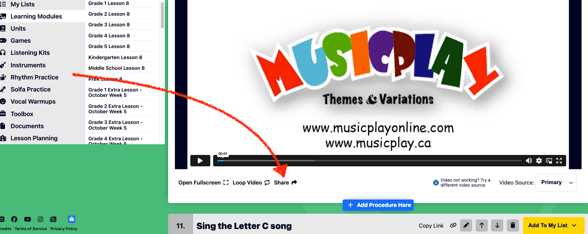
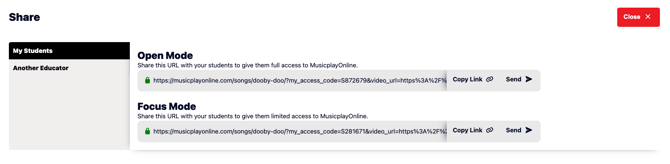
This will open a share window and give you two links you can copy. Sending the 'Open Mode' link will automatically fill in the open mode code for the students when they click the link, allowing them to view the page and then explore the site afterwards.
Sending the 'Focus Mode' link will automatically fill in the focus mode code, letting the students access the resource linked but not allow them to leave the page.
How do I generate my Student Codes?
Each teacher account has two unique Student Codes. If your account was created on or after October 27, 2025, your Student Codes are generated automatically — no setup required. If your account was created before that date, follow these steps:
- Log in to your MusicplayOnline teacher account at musicplayonline.com.
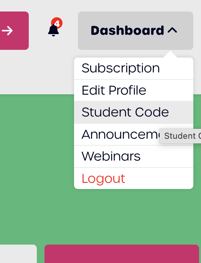
- Go to the Dashboard and select Student Code.
- Click Generate to create your codes. The codes are randomly generated and unique to your account.
- Copy and save both codes so you can share them with students or use them in shared links.
To keep the site secure, codes are randomly assigned and cannot be manually created or changed.
How can substitute teachers get access?
Review our article about giving a substitute teacher access to MusicplayOnline.