Why can't I log in to my MusicplayOnline account?
If you are unable to log in to your MusicplayOnline account, try the steps below before resetting your password:- Try any alternate email address that the account may be registered under.
- If your username/password are automatically filled in by your browser, it might be filling in an incorrect username/password. Try clearing your cookies/browser history.
I forgot my password — how do I reset it?
You can navigate directly to https://accounts.musicplay.ca/forgot-password and follow the steps in the form.
If you haven’t received a password reset email within 30 minutes, our email to you has been caught in a spam filter. Please check your spam folder and if there’s still nothing there, contact us and we'll get you access.
How do I reset my password when I’m logged in?
To reset your password while logged in, follow these steps:
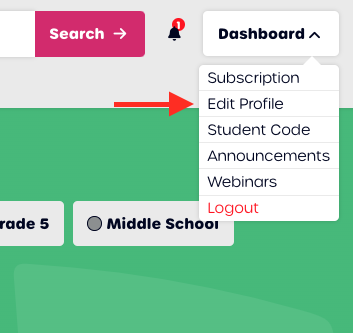
- In the top right-hand corner, click My Dashboard, then click Edit Profile.
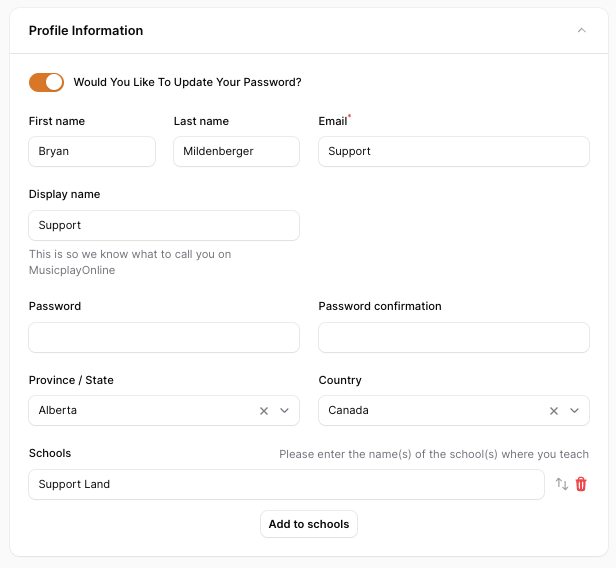
- Toggle the Change Password switch to the right to reveal the password fields.
- Scroll down until you see Change your Password. Enter and save your new strong password.
- You will be automatically logged out and prompted to log back in with your new password.
At the top just under profile information you will see a toggle that looks like this: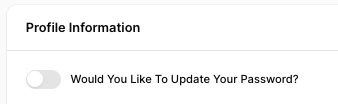
The new password needs to be at least 12 characters long and requires:
- At least 1 uppercase letter
- At least 1 lowercase letter
- At least 1 number
- At least 1 symbol