
How do I reach the Musicplay support team?
You can reach the Musicplay support team during business hours through any of the following methods:
- Email
support@musicplay.ca. - Use the Report a Bug link in the bottom-left corner of any page on MusicplayOnline to submit a bug report or feature suggestion.
- Submit a support ticket online.
- Post in the Musicplay Teachers Group on Facebook for peer support.
How do I report a bug or submit a feature suggestion?
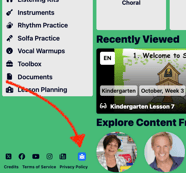
If you encounter an issue on MusicplayOnline, you can submit a bug report or feature suggestion directly from any page on the site. Click the Report a Bug link in the bottom-left corner of the site to open the form. Once submitted, the Musicplay support team will look into your report and get back to you by email during business hours.
What is the Musicplay Teachers Group?
The Musicplay Teachers Group is a free Facebook community for music teachers who use MusicplayOnline. Group members and moderators can help with:
- Answering common questions about MusicplayOnline features.
- Suggesting songs, activities, and lesson ideas.
- Sharing classroom strategies and teaching ideas with fellow music educators.
Join the Musicplay Teachers Group on Facebook.
Note: The Musicplay Teachers Group is a peer community and is not monitored by the official Musicplay support team. For technical issues or account-related questions, contact support@musicplay.ca.