
How you access your receipt depends on where you purchased your item.
How do I get my receipt from MusicplayOnline?
- Log in to accounts.musicplay.ca
- Scroll to the bottom of the page to find Order History.
- Click View Order next to the relevant order.
- The invoice PDF will be at the bottom of the page. Click it to download or print your receipt.
Order history is only available for orders placed after February 2024, when the current accounts system launched. For older orders, email orders@musicplay.ca and the Office Team will assist you.
How do I get my receipt from the Musicplay Store?
- Log in to store.musicplay.ca
- If you don't remember your password, click Forgot my password and enter the email address you used to make your purchase.
- Once you've logged in, click on My Account.
- Scroll down to see your order history.
- Click on the order number to view the full details of your order.
If the product was shipped, a paper receipt will be included in the package.
Please note:
- The store website and MusicplayOnline do not share the same account information. These are separate accounts.
- If the information is not displaying properly or you need an official receipt, please email orders@musicplay.ca and request a receipt.
How do I get my receipt from Musicplay Workshops?
- Log in to workshops.musicplay.ca.
- Click the My Account button and select Billing from the dropdown menu.
- Scroll to the Order History section and click the Documents tab.
- Click the icon beside the relevant purchase to view, print, or download your PDF receipt.
Order history is only available for orders placed after February 2024, when the current accounts system launched. For older orders, email orders@musicplay.ca and the Office Team will assist you.
How do I get my receipt from the Sing! Dance! Play! workshop site?
You can access your receipt directly from your ticket details on the Sing! Dance! Play! event page. To get started, navigate to workshops.musicplay.ca/sing-dance-play.
The current event will be loaded by default. For more information on navigating to other events on the site, see How do I navigate the Sing! Dance! Play! symposium page?
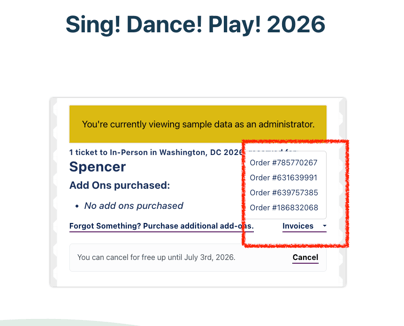
Within your ticket details, look for the Invoices dropdown. Expanding it will display all orders associated with that ticket, including any add-ons purchased separately. Click the relevant invoice to view or download your receipt.
What if I ordered by phone, fax, or purchase order?
Email orders@musicplay.ca and include as much of the following as possible:
- Your full name and email address
- School name and district name
- An administrator's name the order may be listed under
- The approximate date the order was placed
- Payment method (e.g. store website, MusicplayOnline, phone, fax, or PO)
You can expect a response during our business hours. If the product was shipped, a paper receipt will be included in the package.