
Commitment
MusicplayOnline is dedicated to providing inclusive and accessible instructional materials for all students, including those with disabilities. We develop our platform using modern web technologies to ensure compatibility with assistive technologies, and regularly test our standing as we update the resource.
History and Ongoing Improvement
MusicplayOnline was developed from the Musicplay print curriculum and includes assets from many other supplementary resources. As a part of ongoing product development, legacy materials have been regularly reviewed and updated to align with current web technologies.
Flexible ways to Access Content
Many resources can be accessed in several ways, including multiple video versions, audio or audio descriptions, HTML5 interactive activities, static (non-time based) slideshows, printable materials, text based content or extracted text content. This approach is designed to provide flexible access to core instructional content depending on individual needs.
Accessibility Features
- Keyboard-friendly navigation
- Focus follows dropdown menus and stays within open pop-ups until they are closed.
- Custom rhythm notation tools designed to help screen readers interpret musical symbols
- Human-made audio descriptions for actions and instructions in more than 1,500 kids demo videos
- Virtual classroom instruments (find under the Toolbox!)
Using Accessibility Features
Described Audio
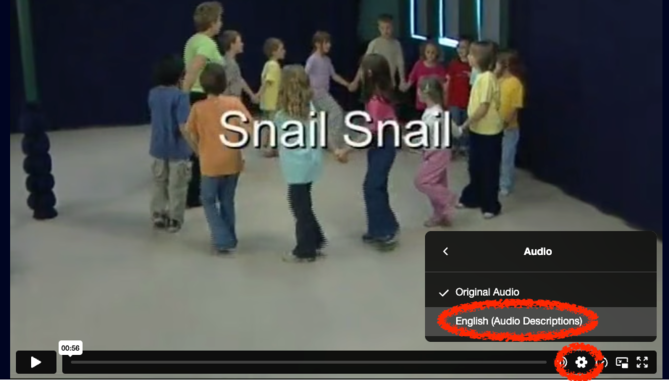
MusicplayOnline features approximately 1500 teacher submitted kids demos which now include described audio. To turn the described audio on, go to the kids demo video and click on the settings icon in the bottom right corner. Please Note: described audio is only available on the Primary video source. Most actions and game directions are also available in the Song Activities PDF.
Captions
Our song videos include on-screen lyrics or transcription, in large legible font, and remain on screen long enough for users to read. For teacher demonstration videos, such as learning choreography or instruments, we have added closed captions or written equivalent content.
Concept Slide Transcripts
Concept slides can serve as a static, non-time-based alternative to many of our song videos, but also include several other types of support.
To open the accessibility panel, click on “Settings” to open the side panel (it may already be open), and then click on the Accessibility icon in the top left corner.


This panel will show a text transcript of the current slide, and will update when changing slides using the Right & Left arrow keys, or arrow buttons in the bottom right.
You can also select the download icon in the top-right corner of the side panel to print a full-page version of each slide. A large-text printout of the text transcripts are also included at the end. This format can support students who need enlarged text, a printed resource, or a simpler visual layout.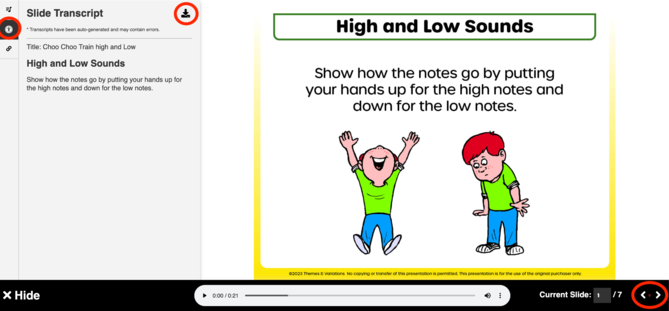
A “Note” on Musical Notation
Music notation can present some significant accessibility challenges due to its highly spatial nature, with each note communicating pitch, rhythm, duration, dynamics, articulation, lyrics, and form at once.
We are continuing to explore emerging technologies which may offer more support towards equivalent facilitation.
Accessibility Conformance Report
MusicplayOnline conforms to WCAG 2.2 Level A and Level AA. For detailed information regarding our conformance levels, please review our Accessibility Conformance Report.
Feedback and Support
We value your feedback on the accessibility of our platform. If you encounter any barriers, please contact our team at support@musicplay.ca.